Create Standout Moments in Just Seconds With QuickFrame AI Effects
The MNTN Team | 3 Min Read
Every brand has a “someday” creative idea.
The glossy, attention-grabbing visual you admire before quietly filing away under “Not for us”, because it feels like it belongs to bigger budgets, bigger crews, bigger everything.
With QuickFrame AI Effects, those moments are finally in reach for advertisers of any size and experience level. Effects makes it easy for anyone to create eye-popping video creative, even those with zero generative AI experience.
This feature generates scenes using a gallery of powerful video effects. This allows advertisers to create that massive memorable moment that’s sure to grab attention, then easily slot in their brand or product to showcase them in ways that feel elevated, intentional, and made to be remembered. All without adding complexity to the workflow.
Effects provides advertisers with advantages that any team using AI-powered video creative will enjoy:
- More control when generating full 15- or 30-second video ads
- Streamlined editing that gets you an amazing output, quickly
- A bank of ideas for how to produce a specific scene or visual style that pops
New Effects are added weekly, so keep an eye on QuickFrame AI to discover fresh ways to make your brand or product look unforgettable.
How Effects Works
Effects helps teams generate more intentional variation: polished scene-level moments that are easier to build, iterate on, and keep consistent with your brand. That means you can move from concept to usable creative faster, while still maintaining the look and feel you want.
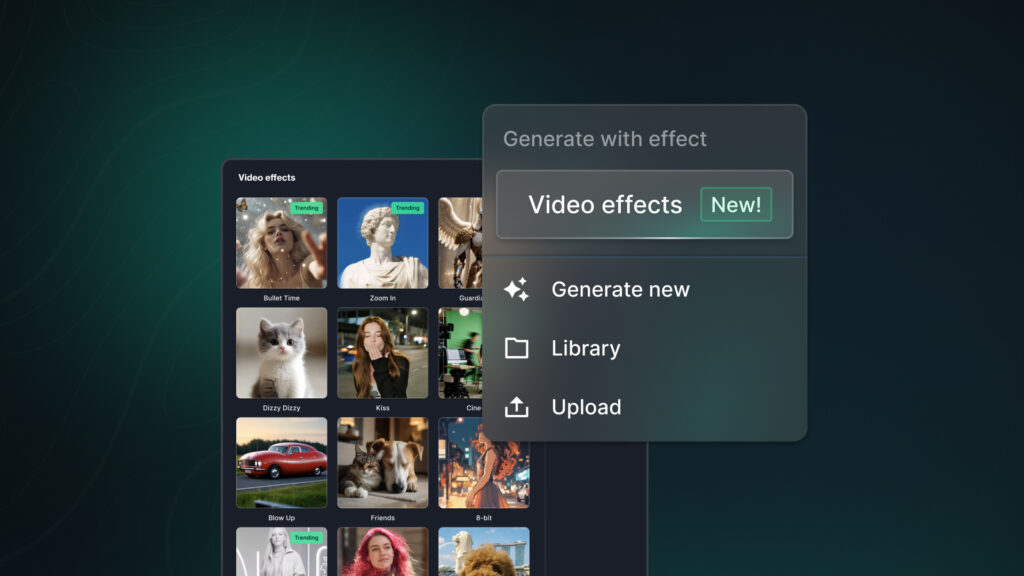
Effects is available directly in QuickFrame AI’s Story and Editor views, with an Effects Gallery that gives you visual starting points for what you want to create. One of our current favorites is “Bullet Time”, which lets you freeze dynamic moments in time, with objects suspended mid-air amidst exploding water droplets, perfect for showcasing products with stylized, action-forward flair.
Here’s a quick breakdown of how you can use Effects:
- In the Story or Editor view, click Replace, and then select “Generate with Effects.”
- Choose a pre-designed effect from the gallery. Effects are grouped into categories like Product, Location, Character to make discovery simple. You can also apply transition effects, filter effects and more.
- Once you’ve selected an effect, provide the required inputs (these vary depending on the effect). You may also upload an optional reference image, like a product shot or brand asset, to insert your brand directly into the selected scene.
- Generate your scene, and watch the effect come to life instantly.
Because Effects is designed to be explored, you can browse, regenerate, and iterate until you find a look that fits your brand and the story you’re trying to tell.
Make Your First Effect in QuickFrame AI Today
That “someday” idea shouldn’t stay on a marketers wishlist. Effects helps you turn ambitious creative ideas into real, brand-ready scenes, so the visuals you’ve been saving can finally become the visuals you’re actually running.
Effects is available now in QuickFrame AI — jump in today to see what you can create.