The QuickFrame AI Prompting Handbook for Performance TV
Jacob Trussell | 8 Min Read
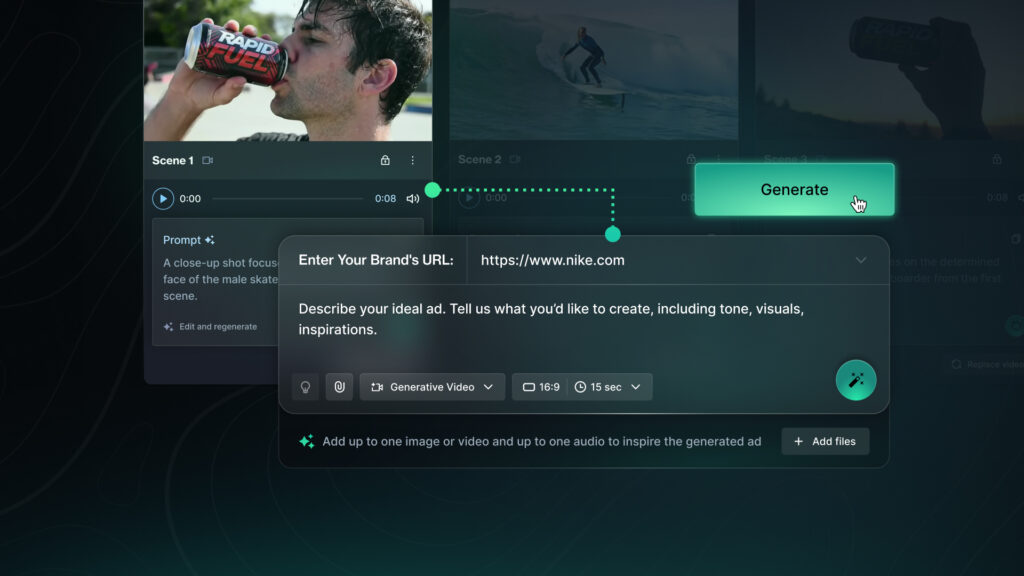
Create Your Next TV Ad in Minutes
Getting your brand on TV used to mean hiring an agency, booking a production crew, and spending a five-figure budget before a single ad hit the screen. QuickFrame AI changes that. It’s the easiest way for marketers to create and launch a TV ad, without any of the hurdles that have traditionally come with creative production.
QuickFrame AI is built from the ground up to get your brand live on premium streaming TV faster than ever. It’s not just another AI video tool in a marketers toolbox. It’s an on-demand creative collaborator, always ready to turn “what ifs” into “oh sweet, that actually works”.
Before you jump in and start playing around, let’s take a look at how QuickFrame AI works, and how you can get the most out of it.
How QuickFrame AI Works
QuickFrame AI’s entry point for creation is the Explore Page. Whether you want to start from scratch with a prompt, drop your product into a ready-made scene, or use a pre-built look and feel as your foundation, you have the flexibility to create what you want, how you want, whenever you want.
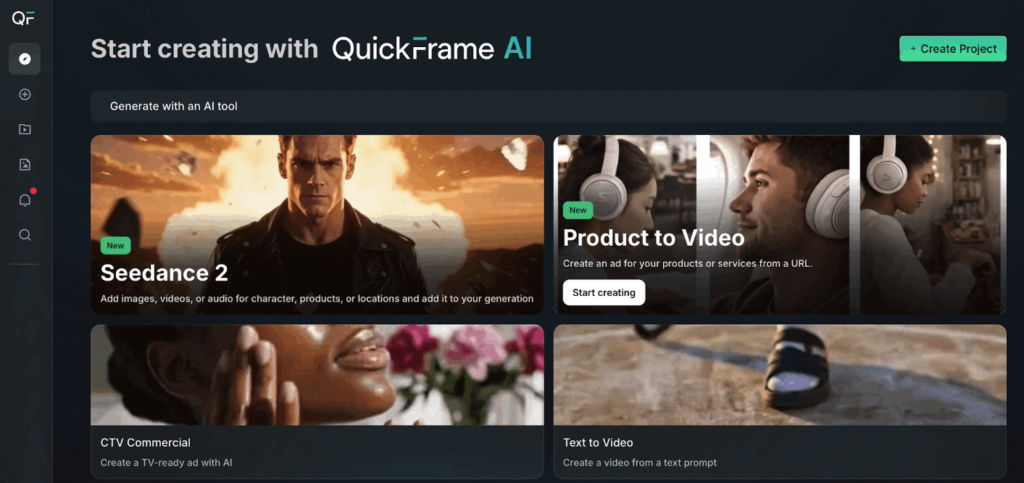
Starting with an AI Tool lets you add a short description and generate a video. You can also add motion to existing images or extend the action of an existing video.
Starting with a Video Effect lets you upload an image of a character or product and drop it directly into a dynamic, pre-built scene.
Starting with a Style lets you select a look and feel that fits your brand, then generate a full :15 or :30 video ad in minutes.
That flexibility is integrated into every part of the platform. And if your goal is getting on TV, one starting point in particular is worth knowing well: the CTV Commercial tool.
The CTV Commercial Tool
This tool is purpose-built for brands that want to go live on streaming TV. Here’s how it works:
- Start with your brand URL. QuickFrame AI pulls your logos, colors, fonts, and tone to automatically build your brand profile.
- Add a quick prompt. Have a vision? Describe it. Need inspiration? Hit Suggestions to browse recommended video concepts.
- Upload supporting assets. Have a specific character, location, product, or existing video you want to include? Upload images or videos and QuickFrame AI will incorporate them.
- Choose a video length. Select a :15 or :30 CTV ad.
- Click Generate. QuickFrame AI builds your ad with CTV best practices baked in.
After the video is ready, you can make edits directly in the platform, then publish it straight to your MNTN account.
Refine Your Ad with Conversational Editing
Once your video is generated QuickFrame AI makes editing as easy as having a conversation with our AI Editing Assistant. Think of it like a chatbot, just a chatbot with the skills, know-how, and attention-to-detail you expect from a professional (and human) video editor. Simply tell the assistant what you want to change through plain-language prompts, and it’ll do the heavy lifting for you.
The best way to give the assistant direction is to structure your requests using this simple formula:
[Action] + [What to change] + [Timing or placement]
Examples:
- “Trim this to 15 seconds and improve pacing in the first half”
- “Rewrite the voiceover to focus on [key benefit]”
- “Add an end card with my brand’s logo and website URL at the end of the video”
We recommend you avoid vague prompts like “make this better” or “make this more engaging.” Instead, describe what should change, where the change should happen, and the outcome you want.
Four Ways to Put the AI Editing Assistant to Work
The assistant covers a wide range of edits, from tightening your cut to swapping out characters, refreshing your voiceover, or reformatting for a different platform. Here’s a look at what’s possible.
1. MNTN Creative Best Practices: Optimize your ad for CTV with a single prompt. The assistant knows MNTN’s creative guidelines and can apply them automatically.
Example:
- “Optimize this video to MNTN best practices”
2. Branding: Increase brand visibility throughout the video.
Examples:
- “Add logo and URL throughout the video”
- “Include an end card with CTA and website URL”
3. Messaging (Script & Voiceover): Rewrite or refine what’s being said and how it’s delivered.
Examples:
- “Rewrite the voiceover to be more conversational”
- “Focus messaging on convenience and ease of use”
4. Visual Enhancements or Changes: Improve engagement and clarity with visual updates.
Examples:
- “Add text overlays highlighting key benefits”
- “Add subtle motion graphics”
The Creative Building Blocks of AI Video Prompting
Prompting is the core mechanic that makes QuickFrame AI go. You don’t need to be a prompt engineer, you just need to know what you want and how to describe it.
Every great TV ad is built on the same underlying components: tone, characters, dialogue, visuals, and pacing. Think of those as the five building blocks for the prompts you’ll use to generate and refine your creative.
1. Tone Modifiers
These set the emotional undercurrent of your ad, the feeling your brand conveys from first frame to last. You want to choose a tone that aligns closely with your brand personality. It can influence everything from visuals to pacing and music, so the more specific you are, the better. Think of words like: “aspirational, triumphant,” “cheeky, self-aware,” or “warm, reassuring.”
Example prompts for this building block:
- “Use a warm, optimistic tone that feels encouraging and genuine.”
- “Give it a witty, tongue-in-cheek attitude with quick pacing and playful narration.”
We wrote this prompt for the following video: “Use a luxurious and serene tone to convey a relaxing experience”.
2. Character Attributes
These define who we see on screen and what kind of people (or personalities) carry your message. They make your ad feel targeted, authentic, and relatable. When thinking about your characters, consider everything that gives your on-screen talent depth: personality, clothes, emotional state, presence. Think of words like: “frustrated Gen Z gamer roommates,” “cool middle-aged dad in casual clothes,” or “energetic red-haired barista wearing a green apron.”
Example prompts for this building block:
- “Cast a stylish spokesperson in a navy suit with a polished, professional demeanor.”
- “Show a middle-aged dad in jeans and a T-shirt speaking with calm authority.”
We wrote this prompt for the following video: “A millennial woman wearing jeans, a green jacket, and carrying a canvas tote bag”.
3. Dialogue & Voiceover
These shape what’s being said and how it’s delivered. It covers not only the words and tone but also the rhythm, accent, and vocal qualities that make your message stick. The right delivery can turn information into emotion, helping viewers connect on a more human level, so don’t be afraid to get granular. Think of words like: “conversational with no buzzwords,” “corporate, but witty,” or “fast-paced dialogue that is sincere.”
Example prompts for this building block:
- “Write conversational banter between two coworkers with a light, humorous tone. One will say ‘No way!‘, and the other will respond, ‘Yes way!’”
- “Use a clear, steady female voiceover with friendly, natural pacing.”
We wrote this prompt for the following video: “A warm and friendly female voice in her 30s”.
4. Visual Style & Setting
Visual style and setting determine how your ad looks and where it unfolds. Think: “NYC subway platform at morning rush,” “golden-hour suburban backyard,” “cozy kitchen during Sunday dinner.” The more vivid and specific, the better the result.
Example prompts for this building block:
- “A street scene with large skyscrapers that go as far as the eye can see.”
- “An outdoor picnic table in a park with an airy, relaxed atmosphere.”
We wrote this prompt for the following video: “Create a picturesque highway along the coast at sunset”
5. Pacing & Rhythm
These set the tempo of your story, influencing how quickly scenes move and how your ad feels overall. A fast pace builds excitement; a slower rhythm creates space for emotion and reflection. Think of words like: “fast and punchy,” “steady and contemplative,” or “gradually build rhythm to the end card.”
Example prompts for this building block:
- “Use quick cuts between shots to build energy and urgency.”
- “Keep a slow, deliberate rhythm that allows emotional beats to land.”
We wrote this prompt for the following video:“Use a series of quick cuts to create an energetic pace and show the product every 2 seconds”
Now It’s Your Turn to Create with QuickFrame AI
And you don’t have to wait for us — create an account to get started today. Setup only takes a few minutes, and best of all, you can start creating for free. So go forth, budding prompt engineers. Your next great TV ad is just a click away.