Oct. 202610 Min. Read
Inside MNTN MCP: Bringing Performance TV Into Your AI Assistant
How people interact with advertising software is changing. A year or two ago, someone would need to log in and navigate to a dashboard to adjust their campaigns or run reports. Now that work can be done through an AI assistant. We’ve noticed a growing number of our customers’ start their days in Claude, ChatGPT, or their editor, and we wanted MNTN to be reachable from there.
MNTN MCP is how we’ve done that. It’s a Model Context Protocol (MCP) server that lets AI assistants work directly with MNTN Performance TV. They can look up campaigns, pull reports, check flights and budgets, and, with the right permissions, make changes. It’s live today in the Claude and ChatGPT app directories, and it works in Cursor too.
This post covers why we’ve developed this tool, how it’s built, and what we learned designing software for a user that isn’t human.
A side project we doubled down on
We put together a small server in front of our platform API, connected it to an assistant, and asked it questions about a real advertiser’s campaigns. At first we figured this would be a neat tool a handful of folks might find useful, but with the answers we were getting back, we could tell this was shaping up to be something special. And not just for our customers.
Obviously the MCP was built with advertisers in mind, but we didn’t expect our internal teams across MNTN to pick it up for their own day-to-day work, or for engineers outside the core team to start contributing to it. They’ve added tools like campaign cloning and campaign updates, and our reporting team now maintains the reporting catalog the assistant works from, so new metrics reach MCP users without a separate project.
For something that started as a cool idea for our customers, it’s been rewarding watching our colleagues reinvent their workflows with it as well.
How it works
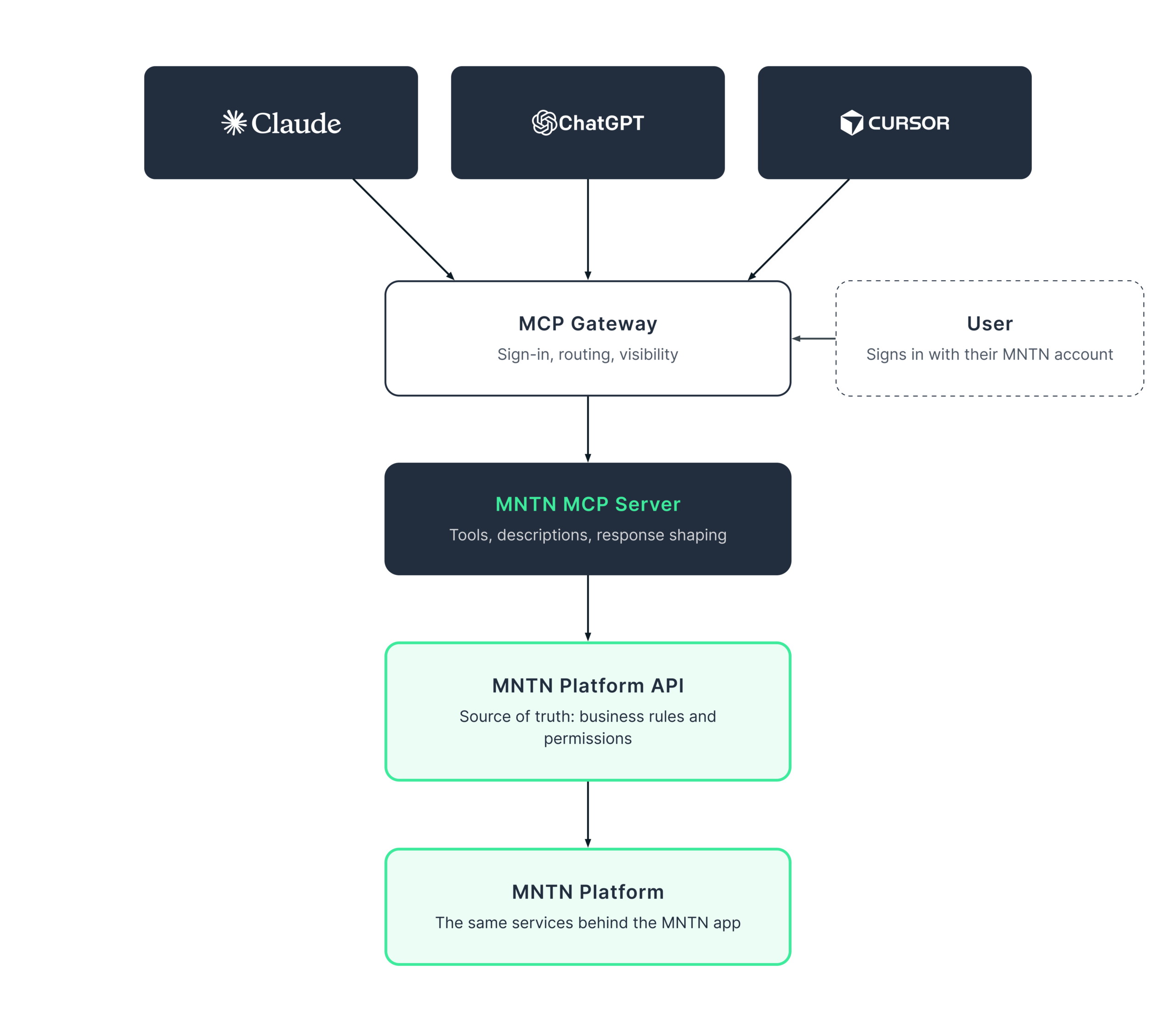
The architecture is deliberately simple:
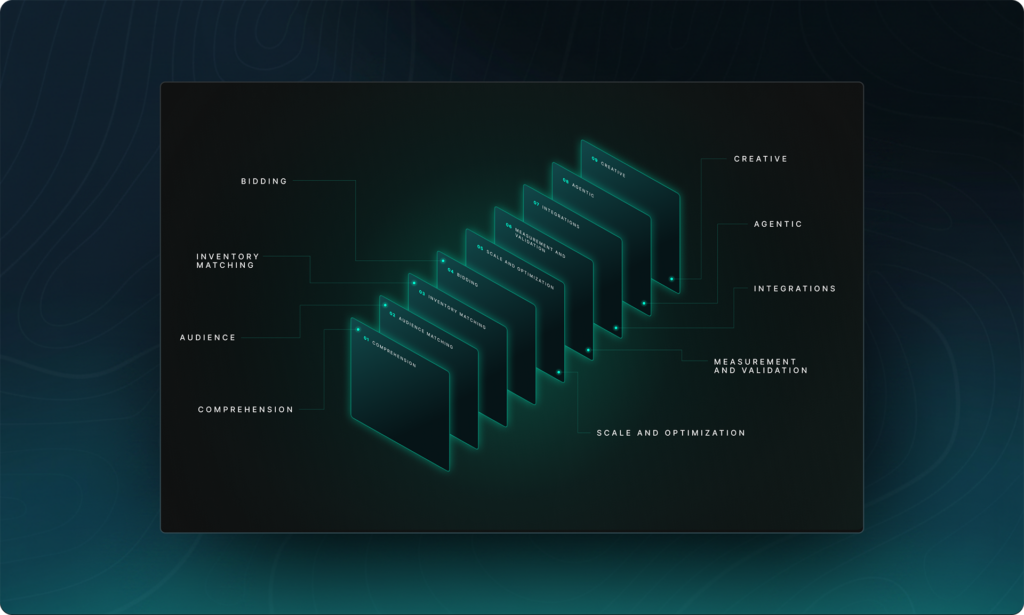
AI client → MCP gateway → MNTN MCP server → MNTN platform API
- AI clients (Claude, ChatGPT, Cursor, and anything else that speaks MCP) connect to a single public endpoint. We build one server, and every MCP-compatible client can use it.
- Users sign in with their MNTN account through a standard OAuth flow and approve what the assistant can do. The assistant acts as that user, never as a shared service account.
- The MCP gateway sits at the edge. It handles authentication and routing and gives us visibility into every tool call.
- The MNTN MCP server translates MCP tool calls into platform API requests and shapes the responses into something a model can reason about.
- The platform API is the source of truth. It sits on the same services and permission model as the MNTN app.
The key decision was keeping the MCP layer thin. It contains no business logic of its own. If a user can’t see an advertiser in MNTN, the assistant can’t either, because the platform API makes that call, not us. Every improvement to the platform API reaches AI clients for free, and we never have to keep a second copy of MNTN in sync.
MCP as a forcing function
The platform API existed before MNTN MCP, but nothing had pushed on it this hard. An assistant is a demanding client; it explores and chains calls together, finding every gap in a way a single integration never would. As the MCP moved, it exposed things the API already needed: richer campaign lifecycle support, budget and flight operations, and clearer errors. We built those into the API as we went, so every future consumer of the API gets them too. MCP ended up being the API’s fastest-growing user and first real stress test.
Designing tools for a model, not a developer
A developer using an API has docs to consult, conventions to fall back on, and their own judgment when something is unclear. A model has none of that; it sees an MCP tool’s name, description, and schema, and from those alone it has to decide whether to call the tool and how.
Turns out designing tools can feel a lot like designing a product. A product team can’t sit next to every user and explain the interface, so the interface has to explain itself. The user in this case is the model, and everything it touches, from the tool’s name to its error messages, shapes how well it does the job.
A few lessons that came out of that:
- We need to teach it our vocabulary. “Flight,” “keyword,” “audience,” and “reach” all mean something specific at MNTN, but a model arrives with only a generic understanding. So each tool defines the MNTN meaning of terms it uses, and the server gives the assistant a primer on how the platform fits together: advertisers own campaigns, campaigns own flights, and there’s no such thing as a “line item.”
- Take out the reporting guesswork. Reporting on MNTN gives you plenty of metrics and dimensions to choose from, but the breadth of options leaves room for an assistant to guess wrong at something like column names. So it asks first what’s available, then builds the report from that curated catalog.
- Errors should give next steps. A bare 400 Bad Request is a dead end for a model. Our errors explain what went wrong in plain terms and suggest the next step, whether that’s fetching a missing ID, fixing a value, or finishing the task in the MNTN app when it’s outside what the tools can do.
- Ambiguity can cost you time. “Show me my campaign budget” is a perfectly reasonable request, but it can also result in five possible meanings and answers. Good tool design gives the assistant enough to resolve that itself (list first, then narrow) or to know when to ask the user for additional context.
Testing when your user is an agent
Building MNTN MCP felt different from any product we’d worked on before, because it was agentic from the first commit. On a typical product, testing means a developer opening a browser, clicking through screens, firing requests from an API client, and doing a lot of manual smoke testing. Here, the user is an AI model, so the most honest test is to hand the server to one.
Most of our testing was done by agents. We connected coding assistants to local and QA builds of the server and gave them real tasks, such as “find this advertiser’s underperforming campaigns” or “set up a budget for this campaign,” and then observed what they did. That turns up a kind of bug a traditional test suite never sees; every call succeeds even as the agent continues to do the wrong thing, and because a description was ambiguous, a parameter name invited a bad guess. When an agent went down the wrong path, the fix was usually changing a few words in a tool description, rather than something inside the code.
There’s a deeper shift underneath that. With a traditional API, you control the caller. You publish a contract, your own UI and integrations call it in well-understood ways, and the same request gets the same result every time. MCP takes that control away. You can describe what a tool is for and suggest how to use it, but the model ultimately decides what to actually do, and agents take care of the rest, including trying sequences our own UI would have never produced.
A surprising number of our platform’s safeguards were assumptions, along the lines of “nobody would ever do that, because the UI doesn’t let them.” But agents did it anyway, quickly and in combinations we hadn’t imagined. They even found bugs that had been sitting quietly in our existing architecture that we’d never caught. Each one pushed a rule out of the UI and into the API, where it’s enforced for every caller. The platform became sturdier for it.
It also changed the speed of the loop. An agent will retry, chain five calls together, and execute an edge case faster than a person can click through a screen, so most of these issues surfaced on QA long before they would ever hit a customer. Unit and integration tests still guard the code, but the question we cared the most about was whether a model, given only what the server tells it, could get the job done safely. The only way to answer that is to ask one.
Write actions get extra guardrails.
Reading data is useful; acting on it is where an assistant starts earning its place in your workflow. MNTN MCP can create, launch, and pause campaigns, update audiences, and manage budgets. A model that makes it effortless to ask for something shouldn’t also make it just as easy do the wrong thing, so we designed write actions with a lot more care:
- Writes are opt-in. Users explicitly approve write access, separately from read access.
- Check before you commit. Before launching, the assistant can run a readiness check that names exactly what’s blocking launch. Budget schedule changes are previewed before they’re applied, so the user sees what will change first.
- Guardrails on spend. Budget changes are bounded, so a misread request can’t move a campaign’s spend dramatically in one step.
- Clear, minimal confirmations. Every write returns a short, formatted summary of what actually changed, which the assistant can relay to the user word for word.
The pod-roll bug, and going stateless early
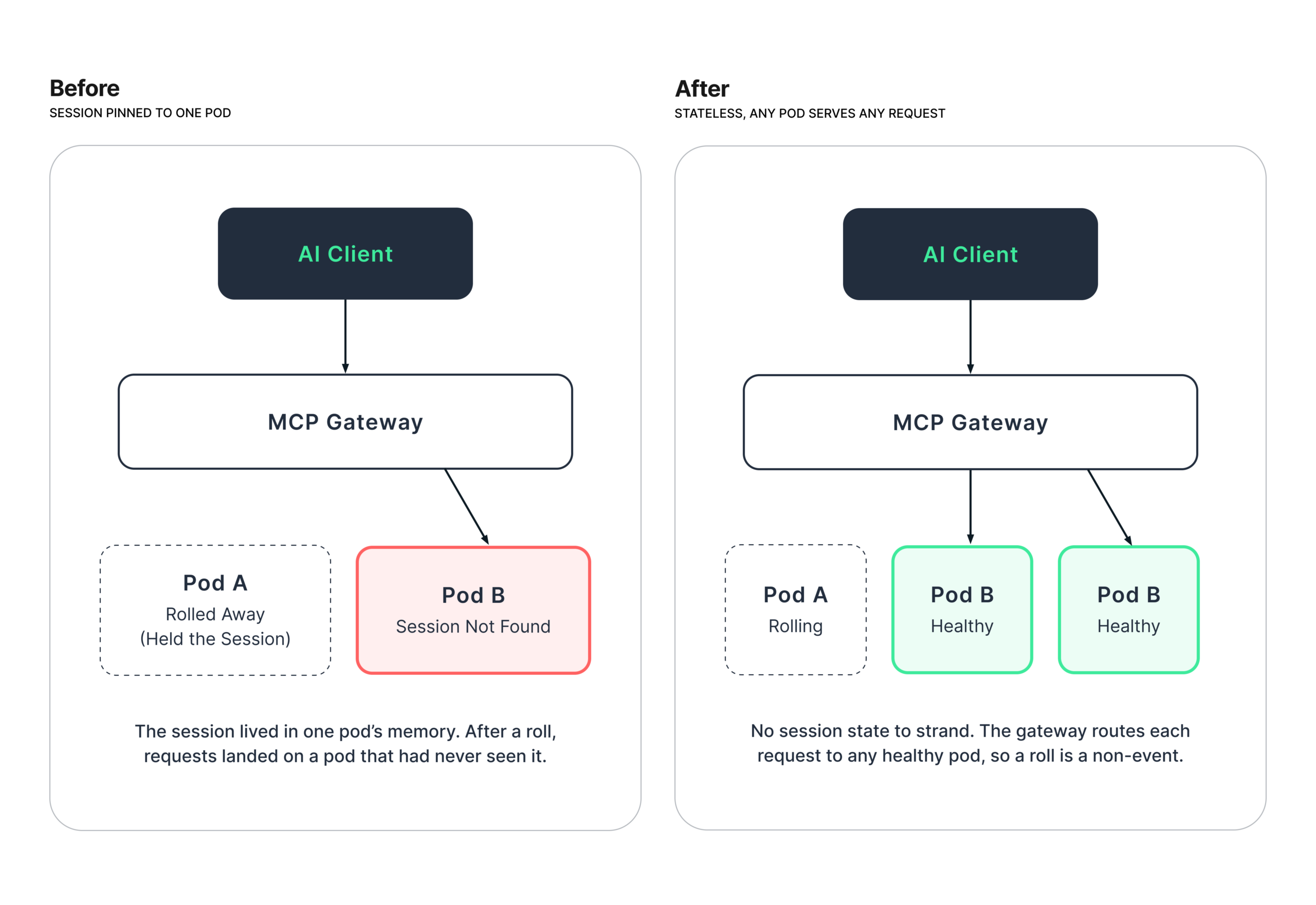
The MCP library we started with kept each client’s session in the memory of whichever server instance it first connected to. In production we run several instances, and every deploy or scale event swaps them out one by one, what we call a pod roll. Each roll sent follow-up requests to pods that had never heard of the session. The gateway then concluded there were no healthy backends, and users lost their conversations mid-task.
The session held nothing we needed. Authentication is checked on every request, and every tool call is self-contained. Sticky routing would have preserved the state we had no use for so we made the server stateless, letting the gateway send requests to any healthy instance. Pod rolls became non-events. That was a call we made in June, and the MCP specification revision released at the end of July moved the protocol the same way, so we had very little to migrate. If your server doesn’t need session state, don’t let a library default give you some.
Why this matters
For advertisers, MNTN MCP means less time navigating and more time deciding. You describe the outcome you want, and the assistant works out which MNTN tools to use. For us, it means the platform reaches people wherever they already work, without building a new integration for every AI product. All you need to do is simply have a conversation. It’s really that easy.